
Search for free pixel art software and you get a shelf: Piskel, Pixilart, PixiEditor, Pixelorama, LibreSprite, GraphicsGale, a scattering of app-store editors. They're all real, they're all free, and they're free in four different senses. What the shelf never tells you is the part that actually decides it — what happens after the sprite exists.
Three questions settle it faster than any feature list. Do you want an install, or a browser tab? Does it animate, on a timeline you can scrub? And when you're done, what does your game engine actually receive — a PNG you slice by hand, or a sheet plus the metadata that says where each frame sits?
Full disclosure before the table: Tsubu is ours, and it's in the roundup. So here's the rule we held ourselves to. Every fact about every other tool was read off that tool's own site, documentation or repository on 2 September 2026, and every source is linked at the bottom. Where we couldn't confirm something at the source, the page says so instead of guessing. And the best pixel-art editor in this field isn't on the list at all: Aseprite is a paid one-time purchase, so it fails the "free" filter and nothing else. It's excluded on price, not on merit.
"Free" means four different things here
Worth separating before anything else, because the word is doing a lot of work:
- Free and open source. Pixelorama (MIT), LibreSprite (GPLv2), Piskel (Apache-2.0) and PixiEditor (LGPL-3.0). Nothing to pay, source on GitHub, and a licence that can't be taken back. PixiEditor also sells optional support tiers with extra brushes and workspaces; the editor itself is a free download.
- Freeware. GraphicsGale, whose own front page still carries the announcement: "June 18, 2017 - GraphicsGale became a freeware!" Free as in price — and Windows as in only, since the site offers an installer and a portable build and nothing else.
- A free web service. Pixilart — free to use in a browser, funded by ads and a Pro tier, wrapped in a large social community.
- Free during early access. Tsubu, which is us: free for early adopters right now, with AI usage sponsored by the platform so there's no per-generation credit cap. That's a limited-time launch offer, not "free forever", and it needs a Google sign-in. We'd rather write the awkward version of that sentence than the flattering one.
The shortlist at a glance
One row per tool, one column per thing that changes your decision. Sources and dates are at the end.
| Tool | Runs on | How it's free | Animation | Export | Best-fit job |
|---|---|---|---|---|---|
| Piskel | Browser, plus offline desktop builds for Windows, macOS & Linux | Open source (Apache-2.0), no account needed | Frame-by-frame with a live preview | Animated GIF, spritesheet PNG/ZIP — no JSON atlas | A quick sprite in a tab, right now, with nothing installed |
| Pixelorama | Windows, macOS, Linux, Android (experimental) and HTML5 in a browser | Open source (MIT) | Timeline with layers, frames, onion skinning, frame tags and audio sync | PNGs, APNG, GIF, video, and a spritesheet with a chosen row/column split — no JSON atlas documented | The deepest free editor, and the one still shipping |
| LibreSprite | Windows, macOS, Linux, Android, plus a browser build | Open source (GPLv2) — a fork of the last GPL Aseprite | Real-time animation previews, onion skinning, layers + frames | Aseprite's Export Sprite Sheet dialog, inherited: sheet image plus JSON data in Hash or Array format, with layers and frame tags | Aseprite muscle memory and an engine-ready atlas, for free, on the desktop |
| PixiEditor | Desktop — Windows, macOS, Linux (Steam, Flathub) | Free and open source (LGPL-3.0); optional paid support tiers | Frame-by-frame timeline, plus node-driven procedural animation | "png, jpg, svg, gif, mp4 and more" per its README; the handbook has no export page | One 2D app for pixel art, painting and vector work |
| GraphicsGale | Windows only — installer or portable | Freeware since June 2017 | Real-time preview while you draw, layers, onion skinning | Frames onto a single sprite sheet, each frame as its own file, or one GIF; also .ico, .cur, .ani, .avi | Old-school Windows spriting, and Windows icons/cursors |
| Tsubu (ours) | Browser — nothing to install, sign in with Google | Free during early access: AI usage sponsored, no credit cap. Limited-time launch offer, not free forever | Frame-by-frame timeline, 1–30 FPS (12 by default), up to 32 frames | PNG, animated GIF, and a sprite sheet plus a JSON atlas (Aseprite/TexturePacker array) at 1×, 2×, 4× or 8× | Draw or draft a sprite, animate it, hand an engine the sheet and its metadata |
Where these tools actually differ
Browser or install
The split isn't as clean as the listicles make it. Piskel opens in a tab and needs no account — that's still its best feature. Pixelorama ships a first-class HTML5 build alongside its desktop apps, and LibreSprite has a browser build too (it loads as 1.1-dev, a desktop UI squeezed into a canvas). Tsubu is browser-only and asks for a Google sign-in before you draw, which is a genuine cost compared with Piskel; what you get back is a cloud library that follows you between machines.
If you specifically want no install, you have at least four free options, and "runs in a browser" is not a differentiator anyone can claim any more. Pick on what happens next instead.
Animation
Every tool in the table animates. The differences are in depth and in ceilings: Pixelorama has the richest timeline here (layers, frame tags, onion skinning, audio sync), GraphicsGale's promise that you "preview your animations in real time while editing sprites" still holds up, and Piskel's live preview is the reason it stuck. Tsubu's timeline is deliberately small — up to 32 frames, 1 to 30 FPS with 12 as the default, which covers the 4-to-8-frame walk cycles most 2D games are made of and not much beyond that.
Whatever you use, the numbers the scene speaks are the same: 4, 6 or 8 frames, 8–12 FPS, 16×16 or 32×32 for a character.
The engine handoff
This is where free tools diverge most, and where roundups usually stop. A "sprite sheet" is just an image with your frames laid out on a grid. An atlas is the JSON next to it that tells the engine where every frame sits, how long it lasts and what the animation is called. Give Unity, Godot, Phaser or Pixi only the image and you type those rectangles in yourself, once per animation, forever.
Two tools in this table write that JSON for you. LibreSprite inherited Aseprite's Export Sprite Sheet dialog, and it still ships: a "JSON Data" checkbox, a format dropdown offering Hash or Array, and optional layer and frame-tag metadata — and its exporter emits the familiar frames / spriteSourceSize / sourceSize / duration shape with meta.frameTags, which is exactly what an engine importer expects. Tsubu writes the same Aseprite/TexturePacker array shape, zipped with the sheet.
The other four don't, as far as each one documents: Piskel writes GIF and a spritesheet PNG/ZIP, Pixelorama writes images and video (it can export tilesets as Godot TileSet resources, added in v1.1.9 back in April 2026 — a different job from an animation atlas), PixiEditor lists image and video formats, and GraphicsGale writes a sheet plus per-frame images.
So atlas export is not a unique capability and we won't pretend it is — not against LibreSprite, and not in general: Free Tex Packer is MIT-licensed and exports "json, xml, css, pixi.js, godot, phaser, cocos2d" for nothing. The honest framing is that atlas export is free and available in several places — the question is whether you want it from a desktop editor, from a second packing program, or from the same browser tab you drew in. If you want to see exactly what an engine does with that metadata, we wrote the two long versions: loading a sheet in Phaser and slicing one in Unity.
Where AI fits — and where it doesn't
Two things are true at once, and most comparison content picks one.
First: free does not mean manual. SpriteGen is a free pixel-art editor with text-to-sprite generation built in, on a metered free tier — "every free account gets 10 AI credits a month" (checked 2 September 2026). Free tools with AI exist; anyone telling you otherwise is selling something.
Second: manual is a legitimate preference, not a deficiency. None of the five other tools in the table advertises AI generation on its site or in its README, and a large part of the pixel-art community wants exactly that. None of them is worse for it, and the craft argument for drawing every pixel yourself is a good one.
Tsubu's position is the middle: AI-assisted, human-refined. It's opt-in, it drafts a first pass, every pixel stays yours to edit, and you can ignore the whole feature and draw. Where we differ from the metered tools is the meter — during early access AI usage is sponsored by the platform, so there's no per-generation credit cap. On training data and provenance, the field hasn't settled the question and neither have we; we'd rather flag that plainly than wave it away. If you ship an AI-drafted frame, treat it as a draft you own and disclose it.
What the table leaves out
Pixilart belongs in any honest list — it's a free online pixel-art tool with a large social community around it, and its own pages describe it as a place to "make pixel art, game sprites and animated GIFs online for free". We've left it out of the table rather than fill a row we couldn't verify: the site blocks automated checks, so we couldn't confirm its current export list at the source today. If community and browser drawing are what you want, go look at Pixilart directly.
The app stores (Pixel Studio, Pixquare and friends) rank on this query too. They're tablet-and-phone tools, several are paid or freemium on desktop, and none of them changes the engine-handoff answer above.
The one we build
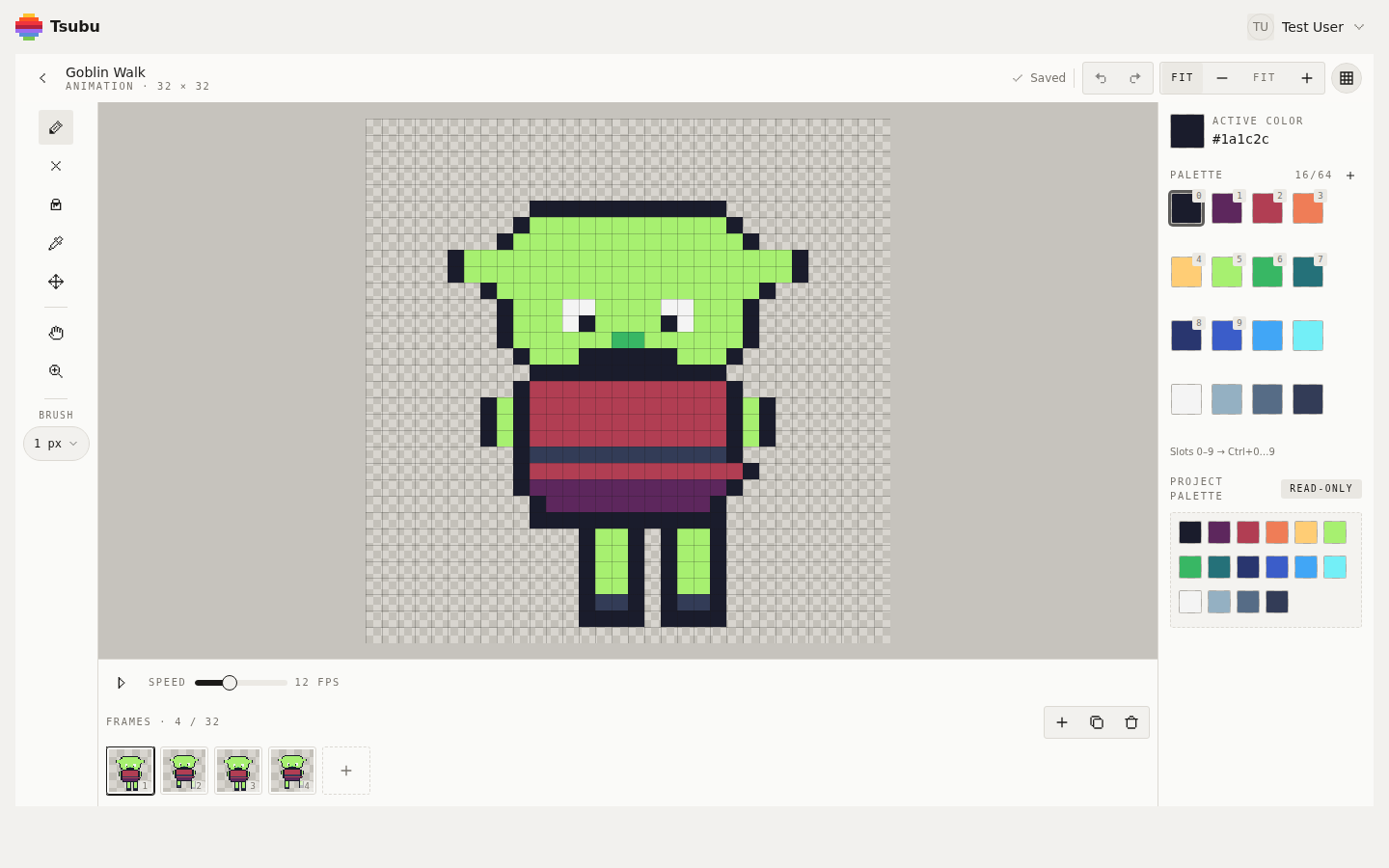
That's the editor as it actually looks, on a 32 × 32, four-frame walk cycle. Left rail: pencil, eraser, fill, eyedropper, select-and-move, pan, zoom, brush size. Middle: the canvas over a checkerboard, so you can see which pixels stay transparent. Right: the active colour and a palette. Bottom: the timeline — play, a speed slider reading 12 FPS, and the frames, four of a possible 32.
You draw on grids from 16 × 16 up to 256 × 256. You can hand it a prompt instead and get a grid-true, limited-palette, transparent first pass to clean up — or ignore that entirely and draw. Export gives you a PNG, a looping GIF, or a zip with the packed sheet and its JSON atlas, upscaled 1× to 8× with nearest-neighbour, all computed in your browser.
The honest limits, since this page is supposed to be useful: there are no layers yet — one editable image per frame — where Piskel, Pixelorama, LibreSprite and GraphicsGale all have them. Animations cap at 32 frames. It needs a network connection and a Google sign-in, where Piskel needs neither. And "free" here means free during early access, not free forever.
Pick by the job
- You want to draw one sprite in the next five minutes, no install, no account. → Piskel. Frozen since its last release — its README says complex changes are "unlikely to be reviewed or merged due to limited time and resources" — but it opens, it draws, it exports a GIF.
- You want the most capable free editor, and you don't mind installing. → Pixelorama. Layers, tilemaps, frame tags, a real timeline, a browser build, and a live release cadence — v1.2.1 landed on 19 August 2026.
- You know Aseprite's shortcuts and don't want to pay. → LibreSprite, the GPL fork of the last open-source Aseprite — which also means you keep the Export Sprite Sheet dialog and its JSON data. Or just buy Aseprite, which is better and not expensive.
- You want one app for pixel art, painting and vector. → PixiEditor, with a node graph if you want procedural work and a frame timeline if you don't.
- You're on Windows and want a fast, classic spriting tool (or need .ico/.cur/.ani). → GraphicsGale.
- Your sprite is going into Unity, Godot, Phaser or Pixi and you'd rather not hand-type frame rectangles. → LibreSprite on the desktop, which exports the sheet and its JSON in one dialog; any other editor above plus a free packer like Free Tex Packer; or Tsubu, which does the draw → animate → sheet + atlas loop in one browser tab.
- You want an AI first pass you can still edit pixel by pixel. → SpriteGen on its free credits, or Tsubu with AI usage sponsored during early access.
Already narrowing between two named tools? We keep two deeper comparisons: switching from Aseprite to a browser studio, and moving off Piskel without losing your sprites, which covers importing your old GIFs and sheets. The Tsubu pixel-art studio is the editor itself.
How we checked
Facts above were read at the source on 2 September 2026. Prices, versions and features change — re-check before you rely on any of it:
- Piskel and its repository (Apache-2.0 licence, maintenance note, export modes)
- Pixelorama, its export manual, the v1.2.1 release (19 August 2026) and the v1.1.9 announcement for the Godot
TileSetexport - LibreSprite (README, licence, platforms), its browser build, its Export Sprite Sheet dialog definition and the exporter that writes the JSON
- PixiEditor, its download page, docs and repository
- GraphicsGale and its download page
- SpriteGen (free tier and AI credits), Free Tex Packer (licence and exporters), Aseprite (paid, for the record)
- Tsubu's own rows describe the running product, shown in the screenshot above
A note on what this is and isn't: this is a source-checked comparison of what each tool documents about itself, plus a screenshot of the one we run. It is not a hands-on review of six installed applications, and we didn't pretend to have benchmarked them.
Make the sprite, then hand your engine the sheet
Any tool on this page will draw you a good sprite. The one that saves you an afternoon is the one whose output your engine reads without translation — so choose the last step first, and work backwards from it.
Open the editor and make a sprite sheet with its atlas — free for early adopters during early access, sign in with Google. New comparisons and workflow guides land on the RSS feed.